SOFTWARE: mapguide: architecture
Autodesk MapGuide™ is a modular web mapping system comprising:
- Server software - a scaleable, fault tolerant, 32-bit, multi-threaded architecture that runs as a service under Windows NT®
- Author software - a user-friendly development tool running locally or remotely under Windows 95®, 98® or NT® used to create custom intelligent map documents called Map Window Files (MWFs)
- Viewer software - an intelligent client running as an ActiveX Control or Plug-In (under Microsoft Internet Explorer® and Netscape Navigator® browsers respectively) that enables non-technical users to interact with simple or complex maps
Autodesk MapGuide™ ships with two additional software packages:
An overview of the MapGuide™ software components is given below. The advantages of Autodesk's approach to network-centric computing, are outlined in an accompanying White Paper.
All MapGuide™ software may be freely downloaded for a trial period from the Autodesk MapGuide™ web site.
Autodesk MapGuide™ Server
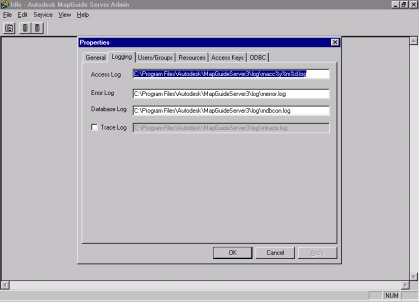
The Autodesk MapGuide™ Server is used to broker requests and deliver maps and map data over intranets or the Internet to users who have installed the Autodesk MapGuide™ Viewer.
Autodesk MapGuide™ Server is a scaleable, fault-tolerant, 32-bit, multi-threaded architecture that runs as a service under Windows NT®.
The Autodesk MapGuide Viewer utilizes Netscape API, ISAPI, and standard CGI interfaces to integrate with Netscape, Microsoft and other Web server products. This allows the service to be scaled up with computing power to support very large numbers of online users.
Autodesk MapGuide™ Server Features and Functionality
- Fault-tolerant, 32-bit multi-threaded architecture runs as a service under Windows NT®
- GUI-based administrator configures:
- Start/stop service
- Log file generation
- Resource security
- MapAgent™ distributes data requests, using RPCs (remote procedure calls), to all online Autodesk MapGuide™ Servers
- MapAgent™ performs dynamic load balancing
- MapAgent™ interfaces with common Web servers using standard CGI, NSAPI, and ISAPI
- Supports simultaneous connections to multiple geographic files and multiple Relational Database Management Sytems (RDBMSs), such as Oracle®, Sybase®, Microsoft SQL Server® or Microsoft Access®, resident locally or residing on UNIX® operating systems accessible on the network
Autodesk MapGuide™ Author
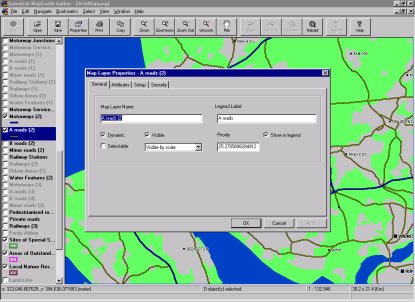
The user-friendly interface in Autodesk MapGuide™ Author is used to create a custom intelligent map document known as a Map Window File (MWF).
The point-and-click interface makes it easy to specify the Spatial Data File (vector) and raster data that you want featured in your application. It's equally simple to set map display properties, the level of interaction within the map, and links to external data sources.
MapGuide™ Author also integrates with the Cold Fusion® Server from Allaire to add even greater levels of interactivity between your intelligent map and other software such as external relational databases, e-mail, and charting packages.
Within the Cold Fusion® Studio development environment, you can apply your knowledge of HTML, JavaScript®, or VBScript® to create the final Web documents that define your application.
Autodesk MapGuide Author Features and Functionality
- Creates/modifies intelligent Map Window Files (MWF) for publishing over an intranet, extranet or the Internet
- Spatial Data File (SDF) Loader utility imports all major GIS data formats
- Includes all Viewer features
- What You See Is What You Get (WYSIWYG) display of authored maps
- Creates static layers for rapid data access
- Map and resource control
- Attribute display by scale
- Thematic map settings and symbology
- Complete layer setup and definition
- Over 140 symbols included in Symbols Library
- Multiple Document Interface (MDI) support
- Automatic labeling by scale
- Support for projections in over 700 coordinate systems
- Customizable pop-up menu
- Link map objects to video, reports, documents, and other Web applications
- Print Preview
- SDF Toolkit allows you to read, write, and modify point/line/polygon data from your customized applications
Autodesk MapGuide™ Viewer
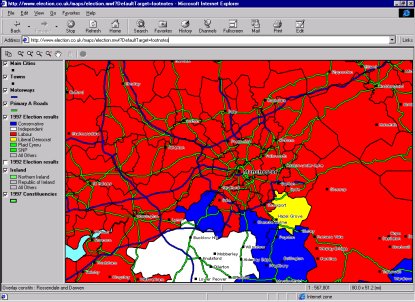
Distributed to end-users free of charge, the Autodesk MapGuide™ Viewer is an intelligent client that enables non-technical users throughout the enterprise to interact with simple or complex maps, collapse or expand themed layers, make queries, create dynamic buffering zones, run custom reports based on selected objects, print to scale, and much more.
The Autodesk MapGuide™ Viewer is distributed as a small (circa 1.5MB) ActiveX Control or Plug-in for Microsoft Internet Explorer® and Netscape Navigator® browsers respectively.
A self-installing version of the Viewer is also available as a pure Java application, to run under Internet Explorer® or Netscape Navigator® browsers on Windows®, Macintosh® and Sun® operating systems.
Autodesk MapGuide™ Viewer Features and Functionality
- Raster/vector-based
- ActiveX control that auto installs with Microsoft Internet Explorer®
- Create dynamic buffer zones
- Multiple object selection by List, Radius, Polygon, Buffer, and Intersection
- Multiline map tips
- Visibility/attributes by scale
- Interactive Legend/Layer control
- Collapse, expand theme layers
- Set map width and scale
- Zoom Go To navigation
- Pan; Zoom Window/Max/Unzoom
- View Incremental and Cumulative Distance
- Copy map to Clipboard
- Print with scale bar, north arrow, and legend
- Map bookmarking
- Billboard feature
- Point and line feature posting
- Multiserver connect to remote spatial and attribute databases
- Open Application Programming Interfaces (APIs) for Netscape® and Microsoft® browser platforms
- Display mouse position in latitude / longitude or local mapping coordinate system
- Intelligent map caching
Allaire Cold Fusion® Server
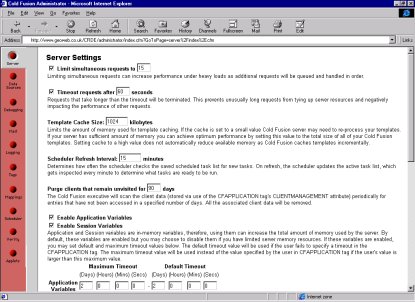
The Allaire Cold Fusion® Server is a proven development system for creating interactive database-enabled sites and dynamic web applications.
With new visual tools and a powerful application server, Cold Fusion gives developers the fastest way to build and deploy a new generation of business software for everything from electronic commerce to interactive publishing to business process automation.
MapGuide™ maps can easily be linked to Cold Fusion® scripts, offering a range of functionality including options to run reports or retrieve information from Relational Database Management Sytems (RDBMSs).
Cold Fusion® Server Features and Functionality
- Application Server - provides the scaleable platform to deliver high performance web applications with any major web server on Windows® or Solaris®.
- Studio - offers the visual database and programming tools to integrate browser, server and database technologies into sophisticated applications quickly and easily.
- Cold Fusion Markup Language (CFML) - provides a powerful fourth generation language (4GL) that uses an intuitive tag-based syntax, ideal for web application development.
- Rapid Application Development - build sophisticated applications faster and at lower costs than possible with any other web application development tool.
- Tight Technology Integration - access cutting edge technology and easily integrate the services provided by database, messaging, directory and file servers.
- Scaleable High Performance - deliver high performance applications that can scale to meet the needs of the most demanding sites and business environments.
- Compatibility With Open Standards - use all of the browser, server, object and database technologies you need in an open, vendor independent framework.
Allaire Cold Fusion® Studio
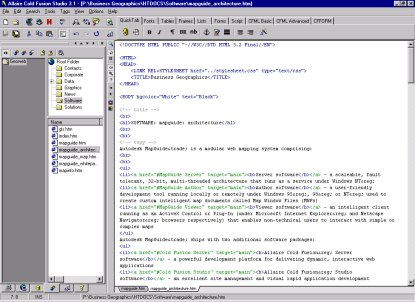
Cold Fusion® Studio accelerates application development with a sophisticated Rapid Application Development (RAD) environment.
Cold Fusion® Studio Features and Functionality
- Customizable Colour Coding - Identify different tags, text and script in the pages of an application with customizable colour coding.
- Auto Editing - Speed page creation with auto editing features including automatic tag completion and tag insight which provides inline prompts for tag attributes.
- Two-way Visual Tag Editing - Work with HTML, CFML and other markup languages with a visual tag chooser and dialogs for inserting and editing tags.
- Point and Click Expression Builder - Create complex Cold Fusion Markup Language expressions that combine functions, values and operators with a visual tool.
- Web Application Wizards - Get started quickly with Web application wizards for creating basic applications and handling common development problems like building HTML tables.
- Dynamic Page Testing - Preview dynamic pages while you are working by opening any external browser.
- Project Management - Keep track of the files in a project no matter where they are stored by setting up independent projects.
- Code Re-use - Save snippets of code or custom tags for quick re-use across pages or applications.
- Local Development - Develop and test applications on your workstation with the single-user version of Cold Fusion Application Server that is bundled with Cold Fusion Studio.
- Query Builder - Create complex SQL statements to select, insert, update or delete data from any ODBC database. Drag and drop tables to create joins, set criteria and use variables within queries. Test queries automatically from within the Query Builder, and save queries for reuse in applications.
- Schema and Data Browsing - View the structure of any ODBC database including tables, column names and data types. Browse data in any table in a database.
- Remote Database Development - Work with databases on remote servers over HTTP without complicated network configuration.
- Version Control System Integration - Manage shared files with any standard version control system (VCS) that supports Source Code Control Interface (SCCI), including Microsoft SourceSafe, Intersolv PVCS and others.
- Bundled StarBase Versions 2.0 - Implement version control with StarBase Versions 2.0, a powerful VCS included with Studio. Check in and check out shared files; track modifications; keep notes and compare different versions.
- Remote Development - Access files and database on remote Cold Fusion servers over HTTP without complicated network configuration. Connect to both Windows and Solaris servers. Use integrated FTP to access files on an FTP server or manage files on your Web server.
© Copyright Business Geographics Limited